Centralized Request Tracking
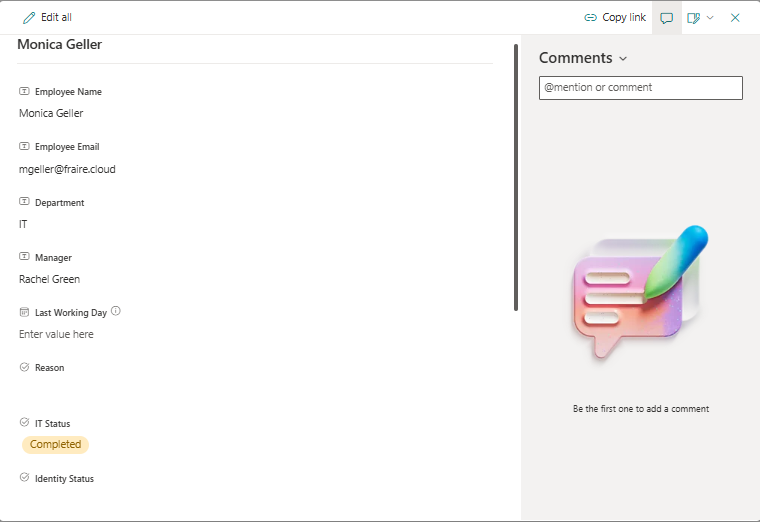
A SharePoint list stores employee details, department, manager, last working day, processing status, ticket information, completion details, and administrative notes.
Project 003 · Microsoft 365 Automation
SharePoint · Power Automate · Office 365 Users · Outlook · Process Automation
Project goal: Create a centralized and repeatable process for tracking employee offboarding requests, validating user information, updating request status, and sending completion notifications.
This project demonstrates a Microsoft 365 identity lifecycle workflow built with SharePoint and Power Automate. The solution uses a SharePoint list as the operational queue for employee offboarding requests and processes pending records through an automated workflow.
The automation retrieves submitted requests, validates the employee through Office 365 Users, updates the request status, sends an email notification, and records completion in SharePoint.
Employee offboarding requests are often tracked through email, spreadsheets, or informal messages. These methods make it difficult to determine request ownership, processing status, completion dates, and whether required actions were verified.
A structured workflow was needed to centralize requests, standardize the process, improve visibility, and create a documented record of completion.
I designed a SharePoint-based offboarding request system supported by a Power Automate cloud flow. Administrators can submit and review requests through the SharePoint list, while the automation processes records marked as Pending.
A SharePoint list stores employee details, department, manager, last working day, processing status, ticket information, completion details, and administrative notes.
Power Automate retrieves pending requests, validates the employee account, updates the request, and sends a completion notification.
The completed SharePoint record creates an auditable history of request status, assigned technician, ticket number, verification, and completion date.
Offboarding request list
Status tracking
Technician assignment
Completion documentation
Manual cloud flow
Get items
Conditional processing
Apply to each
Update item actions
Office 365 Users
Office 365 Outlook
SharePoint connector
Email notifications
The Offboarding Requests list was designed to capture the information needed to manage and document the lifecycle process.
Key fields: Employee Name, Employee Email, Department, Manager, Last Working Day, Reason, IT Status, Identity Status, Completion Date, Assigned Technician, Ticket Number, Completion Verified, and Notes.
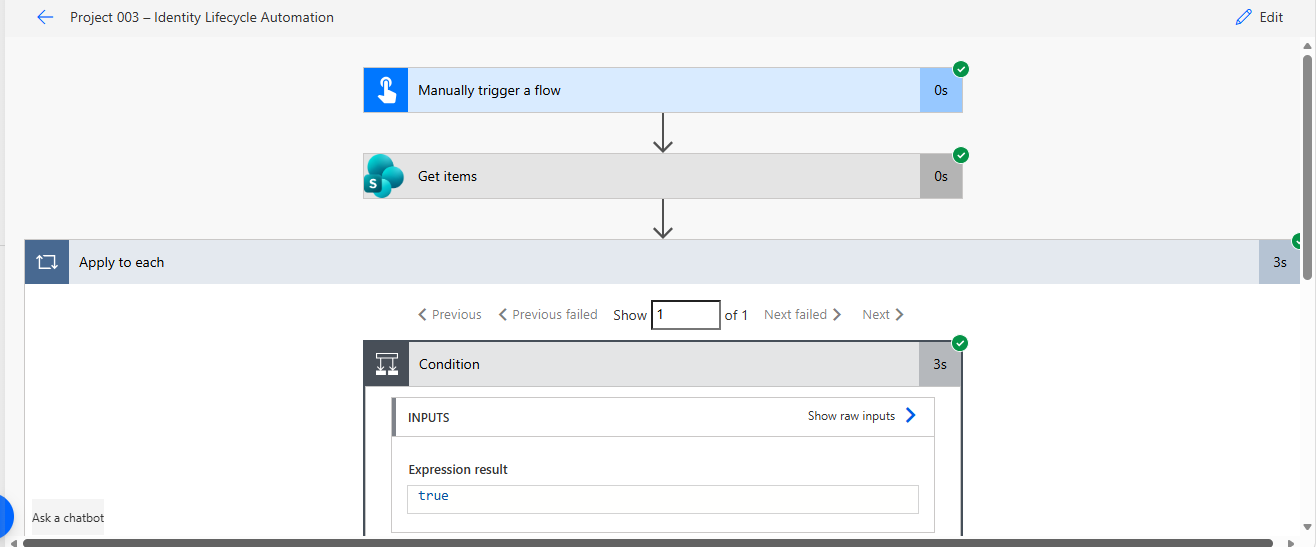
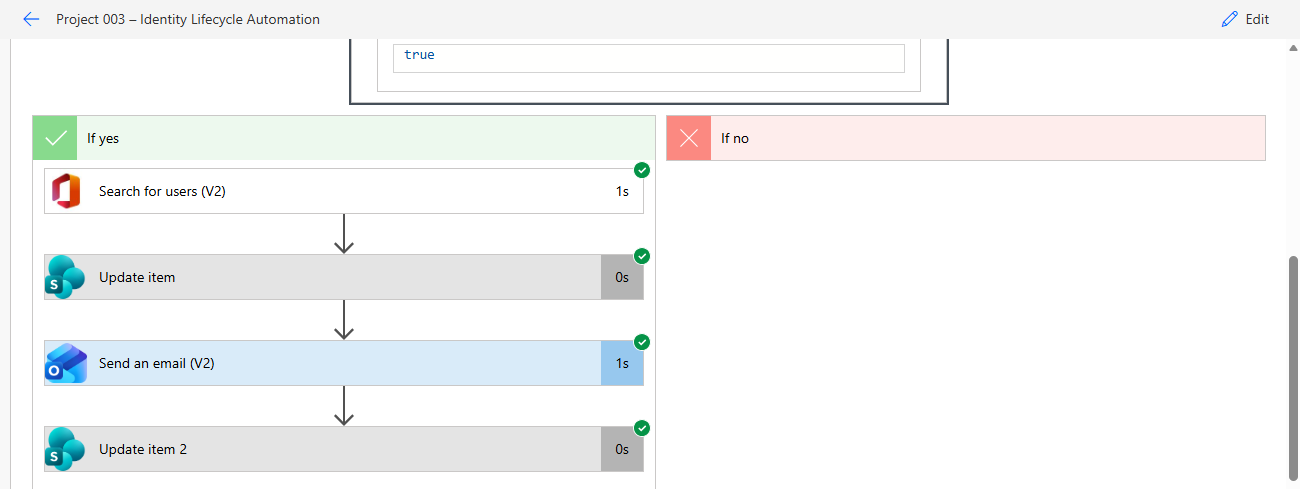
Manual trigger → Retrieve SharePoint requests → Process each item → Check whether IT Status Value equals Pending → Search for the employee → Update request to In Progress → Send email notification → Update request to Completed.
The flow retrieves records from the SharePoint Offboarding Requests list.
An Apply to each action evaluates every returned SharePoint record individually.
A condition checks whether the SharePoint choice field IT Status Value is equal to Pending. Only pending requests continue through the automation.
The Office 365 Users connector searches for the employee using the submitted email address.
The SharePoint record is updated to indicate that processing has started.
An automated email is sent through Office 365 Outlook to document that the request was processed.
The final SharePoint action updates the request to Completed and preserves the processing result in the list.
The workflow was tested with a sample employee offboarding request. The flow successfully identified the pending record, located the user, updated the SharePoint item, sent the notification email, and changed the request status to Completed.